
Asset docs, done in minutes.
Document every third-party asset in your game and export a clean, submission-ready CSV. No spreadsheets, no missed fields, no stress.
One-time purchase · Editable code · Free proof of concept on the store page
At a Glance
How It Works
Log an asset
Answer six prompts: platform, where it's used, how it's used, asset name, creator and license type.
Confirm it
See a formatted summary and say "Is this correct?" before anything is saved. Then add the next one.
Export the CSV
Everything lands in one clean file, ready to drop into your submission package.
See It Work
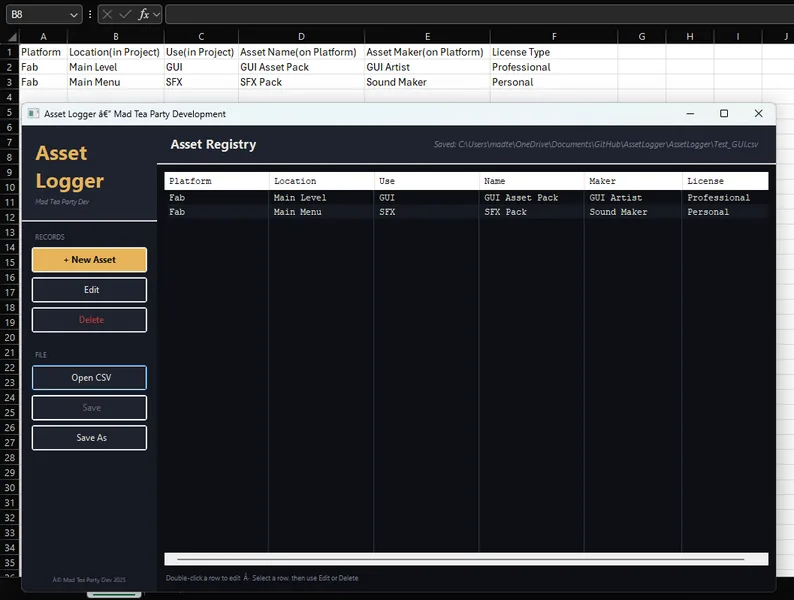
Answer, confirm, repeat
Each asset takes seconds. Fill in the six fields, confirm the summary, and add another or wrap up.
- Fab, Unity Asset Store, Unreal Marketplace and more
- Where and how it's used in your game
- Creator and license, recorded right
Out comes a clean CSV
One tidy, comma-separated file, with a safety check before any overwrite.
What It Does
Guided entry
Prompts for every required field, so nothing gets missed.
Confirmation step
A formatted summary of each asset before it's saved.
Multi-asset sessions
Log as many assets as you need in one go.
Clean CSV export
A structured file, ready for platform documentation.
File safety
Warns you and asks before overwriting an existing CSV.
Fast & focused
Lightweight and distraction-free. Open it, log it, ship it.
Perfect for
Yours to Keep
No subscription, no tiers. $1.99 and it's yours.
Add fields or change the export to fit your pipeline.
Your CSVs stay in your folders, on your PC.
Used By
Games documented with Asset Logger.
One Price, Once
Asset Logger
Every feature, editable code. Want to try first? Grab the free proof of concept.
Questions
Is it a subscription?
No. One payment, yours to keep.
What does the CSV contain?
One row per asset: Platform, Location (in game), Use (in game), Asset Name, Asset Maker and License Type.
Can I log lots of assets at once?
Yes. After each one it asks "Do you have more assets?" and keeps going until you're done.
Will it overwrite my old file?
Only if you say so. If the CSV already exists, it warns you and asks first.
Can I edit it?
Yes. Every Mad Tea Party tool comes with editable code so you can customize it.
Mac or Linux?
Windows only for now.
Ship it with the paperwork done.
Every asset logged, every field filled. $1.99, once.
Get Asset Logger · $1.99Ship with confidence
Prepping a Steam submission? Have a field you wish it tracked? Come hang out, ask questions, and help shape the next version. It's your code too.